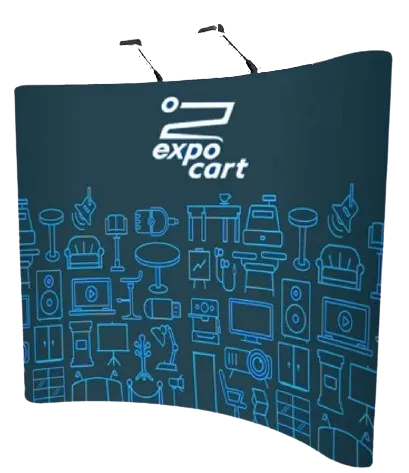
RELITACK Pop Up Stand Pasting Clip provides firm media support for exhibitions, events, retail promotions, advertising displays, and commercial presentations.
RELITACK Pop Up Stand Pasting/Clip is a practical display accessory designed to secure printed graphics, panels, and promotional media to compatible pop up exhibition stands. It supports accurate alignment, clean installation, and a professional presentation for trade shows, retail promotions, corporate events, product launches, conferences, and branded display environments.
The accessory can be used according to the construction of the selected display system. A pasting method provides direct attachment to a compatible panel or stand surface, while a clip method can hold the graphic securely and may allow easier replacement when campaign artwork needs to be updated.
RELITACK Pop Up Stand Pasting/Clip is intended for compatible portable display structures commonly used at exhibitions, presentations, conferences, showrooms, retail spaces, and promotional events. It helps connect the printed graphic to the stand so the complete display remains organised and visually balanced.
Correct fitting helps printed panels remain properly positioned across the front or sides of the stand. This supports a clean appearance and reduces the risk of movement, uneven spacing, or incorrect alignment during display.
The pasting method allows compatible printed media to be attached directly to a suitable section of the pop up display. This method can provide a neat and secure result when the graphic, adhesive, stand surface, and installation method are properly matched.
Before installation, the attachment area should be clean, dry, smooth, and free from dust, grease, moisture, and old adhesive residue. Careful positioning is important because incorrect placement may cause gaps or uneven panel alignment.
The clip method can hold printed panels or graphic sections in position without requiring permanent fixing. It may be useful for businesses that regularly replace campaign artwork, event information, product graphics, or promotional messages.
The printed material should be inserted evenly into the compatible clip. The complete edge should remain secure so the graphic does not slide, move, or become uneven during use.
Pop up display systems often use several graphic panels placed next to one another. Accurate alignment is important for maintaining continuous artwork, straight text, complete logos, and matching design sections.
RELITACK Pop Up Stand Pasting/Clip helps support correct placement when the panels are measured, printed, trimmed, and installed according to the display system dimensions.
This accessory is suitable for businesses that require portable display solutions for exhibitions, trade shows, seminars, conferences, promotional events, and temporary presentation areas.
Once the graphic panels are attached correctly, the display can present company information, product images, service details, promotional messages, contact information, and customised branding in a large visual format.
RELITACK Pop Up Stand Pasting/Clip can support a wide range of indoor commercial, promotional, and presentation applications.
Pop up stands are widely used at exhibitions and trade shows because they create a large visual background while remaining practical to transport and assemble. RELITACK Pop Up Stand Pasting/Clip helps attach the printed panels so the complete artwork appears neat and properly arranged.
A correctly prepared display can be placed behind exhibition counters, product areas, presentation spaces, reception desks, and demonstration zones.
Corporate businesses can use pop up displays for conferences, meetings, media events, training sessions, product announcements, recruitment activities, and professional presentations.
The attached graphics can feature company branding, campaign messages, service information, project details, brand values, event schedules, and sponsor logos.
Retail businesses can use pop up stands for seasonal promotions, product launches, discount campaigns, store events, branded photo areas, and customer information displays.
The pasting or clip attachment method helps keep the printed panels connected to the display system while maintaining a clean and professional appearance.
Depending on the selected display system, clip based attachment may allow printed panels to be replaced when the advertising campaign, brand message, or event artwork changes.
Replacement panels should match the original width, height, thickness, curve, and attachment requirements of the pop up stand. Compatibility should be checked before removing the existing graphics.
Many pop up stands use several printed panels that connect to form one complete background. Each panel should be prepared with accurate measurements so the artwork continues smoothly across the display.
Careful attachment helps reduce visible gaps and supports consistent spacing between logos, photographs, text, and design elements.
A properly installed graphic helps the pop up stand create a polished and organised presentation. Panels should remain straight, smooth, and correctly aligned when the display structure is fully opened.
Incorrect fitting may cause movement, curling, visible gaps, uneven edges, or mismatched artwork. Careful preparation and installation can reduce these issues.
RELITACK Pop Up Stand Pasting/Clip may be used with compatible printed display panels, laminated graphics, flexible media, magnetic panels, or other materials suitable for the selected stand.
The thickness, flexibility, weight, surface finish, and construction of the printed media should be checked before installation. Material that is too heavy or unsuitable for the frame may affect the display performance.
Measure the complete pop up display structure carefully before preparing the graphic panels. Confirm the width and height of every panel, including the central and side sections.
Incorrect measurements may cause gaps, overlapping, poor alignment, or incomplete coverage of the display structure.
Prepare the artwork according to the exact number and dimensions of the graphic panels. Important text, logos, faces, product images, and contact details should not be placed directly across panel joints unless the layout has been checked carefully.
A complete display preview is recommended before printing. This helps confirm that the artwork remains correctly aligned across all panels.
Make sure every printed panel is fully dry before trimming and installation. Cut the panels carefully and check that the edges remain straight.
Label the back of each panel according to its position, such as left, centre, right, upper, or lower. This can help simplify installation and reduce placement errors.
Clean the stand or panel attachment area before applying the graphic. Mark the correct position and align the printed media carefully before pressing it into place.
Apply the graphic gradually and maintain even pressure across the complete attachment area. Check the position before creating a permanent bond.
The selected adhesive should be compatible with both the printed panel and the pop up display surface.
Open the compatible clip and insert the graphic edge evenly. Confirm that the printed side faces the correct direction and the complete panel remains centred.
Close the clip securely and test the attachment gently. The graphic should not move or slide when light pressure is applied.
Begin installation with the central panel when the display system requires it, then continue with the surrounding sections. Check the artwork alignment after attaching every panel.
Make small adjustments before securing the next section. This helps prevent errors from continuing across the complete display.
Open the pop up frame carefully and secure all locking points before attaching the graphic panels. The structure should remain stable, level, and fully expanded.
Follow the display system instructions when installing support bars, magnetic strips, clips, rails, feet, lights, or other accessories.
After installation, inspect the complete display from the front and sides. Check that all panels remain smooth, aligned, and securely attached.
Confirm that logos, text, photographs, and design elements continue correctly across the panel joints.
Before replacing a graphic, identify how the existing panel is attached. Release clips or remove pasted sections carefully to avoid damaging the stand.
Clean the attachment area and remove any adhesive residue before fitting the new panel. Replacement graphics should match the stand dimensions and panel arrangement.
Handle display panels and attachment accessories with clean and dry hands. Avoid bending clips, scratching surfaces, folding graphics, or placing heavy objects on the printed media.
Keep small clips, fittings, and accessories together during assembly, transport, and storage.
Inspect the clips, pasted sections, frame connections, panel edges, and graphic alignment regularly. Check for movement, lifting, damage, or loose components.
Damaged attachment parts should be repaired or replaced before the display is used again.
Remove the graphic panels carefully before closing the pop up frame when required by the display system. Avoid pulling sharply or bending the panels.
Release the frame locking points gradually and fold the structure according to the manufacturer instructions.
Store the pop up stand, printed panels, clips, and accessories in a clean, dry, and controlled environment. Keep them away from direct sunlight, excessive heat, moisture, dust, and heavy objects.
Use suitable carrying cases when available. Printed panels should be stored flat or rolled carefully according to their material and construction.
RELITACK Pop Up Stand Pasting/Clip provides a practical solution for securing printed panels to compatible exhibition and promotional display systems. It supports accurate alignment, clean installation, graphic replacement, and a professional presentation across a wide range of business environments.
Its suitability for pasting and clip attachment methods makes it a useful accessory for printing businesses, exhibition companies, retailers, event organisers, corporate users, advertising agencies, and professional display installers.
Fill out the form below for , and our team will get back to you shortly.
